6 January 2026
Alarm System Reprogram Newmarket, Brisbane: Paradox App Fix
Regain Control: Alarm System Reprogram in Newmarket
Is there anything more frustrating than having a “smart” security system that refuses to be smart? You bought the system for the convenience of arming it from your phone and checking on your home while you’re at work. But when the app stops connecting or your user codes stop working, that expensive technology becomes a headache.
Modern security systems are reliant on software just as much as hardware. Recently, Fallon Solutions visited a home in Newmarket to assist a resident who had lost digital control of their property. Their Paradox system was functioning locally, but the app access had failed, leaving them disconnected from their home security.
If your alarm app is spinning or refusing to log in, it’s rarely a problem with your phone. It’s usually a programming conflict within the main panel. Here is how we got this Newmarket home back online.
The Problem: The Disconnected App
The homeowner in Newmarket contacted us with a specific digital issue: “Reconfigure programming and app access for Paradox Alarm System and Insite Gold app.”
The Paradox alarm system is a high-quality, robust security platform, widely used across Brisbane. However, the connection between the alarm panel in your cupboard and the Insite Gold app on your phone relies on a specific internet module (IP Module) and cloud server settings.
Signs Your Alarm Needs Reprogramming:
- App Connection Failure: The most obvious sign is opening the app and seeing a “System Offline” or “Connection Failed” message, even though your home internet is working fine.
- Lost User Codes: Sometimes, after a power outage or a router change, the system might scramble or lock out user codes, denying security alarm access.
- IP Conflicts: If you change your NBN provider or modem, the alarm system might not automatically update its IP address, breaking the link to the outside world.
- Swan Server Issues: Paradox uses a cloud service called “Swan” to bridge your phone and your alarm. If the site registration expires or the serial number configuration is wrong, the link breaks.
For this customer, the hardware was fine, but the software configuration had drifted, locking them out of remote management.
The Solution: Reconfiguration and App Setup
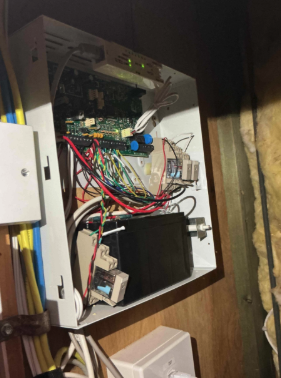
Upon arrival, our licensed alarm service technician connected directly to the Paradox main panel. Reprogramming isn’t just about pressing buttons on a keypad; it often requires a laptop interface to adjust the deep settings of the system.
Here is the step-by-step process we used for the alarm system reprogram:
- System Diagnostics: We accessed the main panel and checked the status of the IP Module (the device that connects the alarm to the internet). We confirmed it was powered but not communicating correctly with the cloud server.
- IP Configuration: We reconfigured the network settings. Instead of “Replaced network card,” we updated the IP module’s communication path, ensuring it was correctly shaking hands with the home’s router and the external server.
- Site Registration: We checked the site registration status on the Paradox Swan server. We ensured the panel’s unique serial number was correctly linked to the customer’s account email.
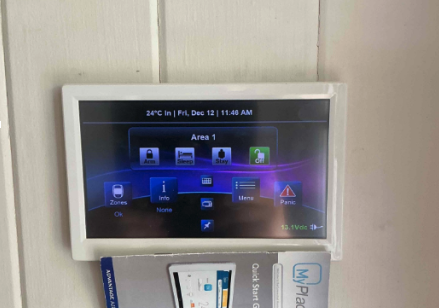
- App Setup: We deleted the corrupted site profile from the customer’s Insite Gold app and created a new one. We input the fresh credentials and tested the connection.
- User Code Management: We reviewed the user codes stored in the system to ensure the homeowner knew exactly which codes were active and deleted any old or unused ones for better security.
- Remote Test: We asked the customer to turn off their phone’s Wi-Fi (using 4G data) and attempt to arm the system remotely. The system responded instantly, confirming the remote access was fully restored.
The Benefits for the Homeowner
Investing in a professional alarm system reprogram restores the full value of your security investment:
- Remote Management: The homeowner can now arm and disarm the system from anywhere—perfect for letting in cleaners or tradespeople without giving out a physical key.
- Instant Notifications: If the alarm triggers, the app sends a push notification immediately, allowing for a faster response than a traditional siren alone.
- Peace of Mind: Knowing the system is online and communicating correctly means the home is genuinely protected, not just pretending to be.
- Ease of Use: A properly programmed system is easy to live with, reducing false alarms and user frustration.
Why Choose Fallon Solutions?
Security programming is a niche skill. Many electricians can install a wire, but they may not know how to configure the IP settings of a Paradox or Bosch panel.
When you search for “home security” experts in Newmarket, you need a team that understands the software as well as the hardware. At Fallon Solutions, our security technicians are trained on specific brand protocols. We understand the intricacies of port forwarding, IP modules, and app integration. We don’t just leave you with a manual; we ensure the app is working on your phone before we leave. For more information on our security services, visit our security trade area.
Alarm System Experts
Don’t let a “Connection Failed” message leave your home vulnerable. If you can’t access your alarm via your phone, or if you need to update your user codes, a professional reprogram is the quick, secure solution.
If you need an alarm system reprogram or help with your Paradox alarm system in Newmarket or the Northern Suburbs, get connected with the experts. Contact Fallon Solutions today for fast, reliable service! Call us on 1300 054 488 or send us an enquiry here.